
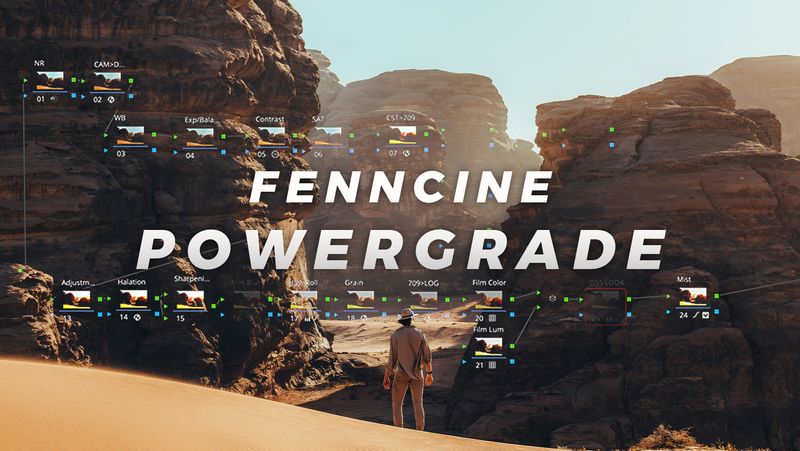
FennCine Film Davinci Resolve Powergrade
🎞️ FennCine Film PowerGrade for Davinci Resolve
Transform your footage with the exact node structure I use for cinematic, filmic color.
This professionally built PowerGrade unlocks the full color potential of your camera, no matter the brand — RED, Sony, Canon, Blackmagic, Nikon, even drones and phones.With just one drag-and-drop, you’ll access the tools and techniques colorists use on high-end productions.
🎨 What’s Inside:
✅ Works with all camera profiles
✅ Fully customizable Davinci node tree
✅ Built-in filmic effects (all toggleable):
- Halation simulation
- Highlight rolloff
- Lens diffusion / glow
- Optional tints + final film look node
🛠 Color Management Settings:
- Timeline Color Space: DaVinci Wide Gamut / Intermediate
- Output Color Space: Rec.709 2.4
📌 Just apply your Input CST settings to the first node labeled
CAM > REC709, make your usual grading adjustments, and you're good to go.
⚡ Why Use This PowerGrade?
- Save hours building node structures
- Learn pro techniques by reverse-engineering the tree
- Instantly elevate your grades with a battle-tested look
- Perfect for narrative films, travel, branded work, and YouTube
📦 Installation Instructions:
- Go to the Color tab in DaVinci Resolve
- Open the Gallery (top-left)
- Right-click to create a PowerGrade folder if one doesn’t exist
- Select the folder, right-click, and choose Import
- Import the included
.drxfile
🎥 Use it, study it, and make it your own.
🔒 License & Usage:
- Commercial & personal use allowed
- Redistribution/resale prohibited
- Want to share? Send them this page